


Skip to the main content.

11 min read

The Complete Healthcare IT Checklist for Modern Facilities

A healthcare IT checklist should include network segmentation, PHI encryption, access controls, EHR integrations, wireless and IoT device security, endpoint management, centralized logging, patch management, disaster recovery testing, and remediation planning. It should help healthcare IT teams verify that clinical infrastructure, EHR systems, wireless networks, connected devices, and security controls are supporting patient care, protecting sensitive data, and meeting HIPAA technical safeguard requirements.

Healthcare had the highest average data breach cost of any industry in IBM’s 2024 report, at $9.77 million per incident, and hacking or IT incidents accounted for 589 large healthcare data breaches in 2024, representing 81.2% of the year’s total.

This checklist gives healthcare IT teams a practical framework to identify critical gaps, prioritize remediation based on clinical impact and regulatory risk, and build a roadmap that protects patient data while supporting efficient healthcare delivery.

This guide covers

  • A comprehensive healthcare IT infrastructure checklist covering network, security, EHR, wireless, and monitoring

  • How to classify findings by risk to patient care and PHI exposure

  • A structured approach to building 90-day, 6-month, and 12-month remediation plans

  • Practical guidance on aligning IT investments with clinical workflows and HIPAA compliance requirements

Healthcare IT Priorities: What to Verify First

  • Verify network segmentation keeps EHR, guest Wi-Fi, and biomedical devices on separate secure VLANs.

  • Confirm PHI is encrypted in transit and at rest across EHR, backups, and cloud services.

  • Ensure role-based access controls limit EHR and health app access to authorized clinicians only.

  • Review interface engine monitoring to catch failed lab, imaging, or order integrations affecting patient care.

  • Validate wireless coverage in clinical areas and confirm WPA3 or enterprise authentication is enabled.

  • Centralize log collection from EHR, firewalls, switches, and wireless controllers for audit and incident response.

  • Document patch management windows coordinated with clinic schedules to minimize disruption to clinical workflows.


Why Healthcare IT Infrastructure Needs Its Own Checklist

Uptime, performance, and cost are the basic metrics for any business relying on IT applications. Healthcare IT must also account for patient safety, PHI protection, regulatory scrutiny, and the reality that every network delay or security gap can directly affect clinical outcomes. A dedicated healthcare IT checklist addresses the unique intersection of clinical workflows, HIPAA technical safeguards, and the cyber threats targeting healthcare organizations.

Why Healthcare IT Infrastructure Needs Its Own Checklist

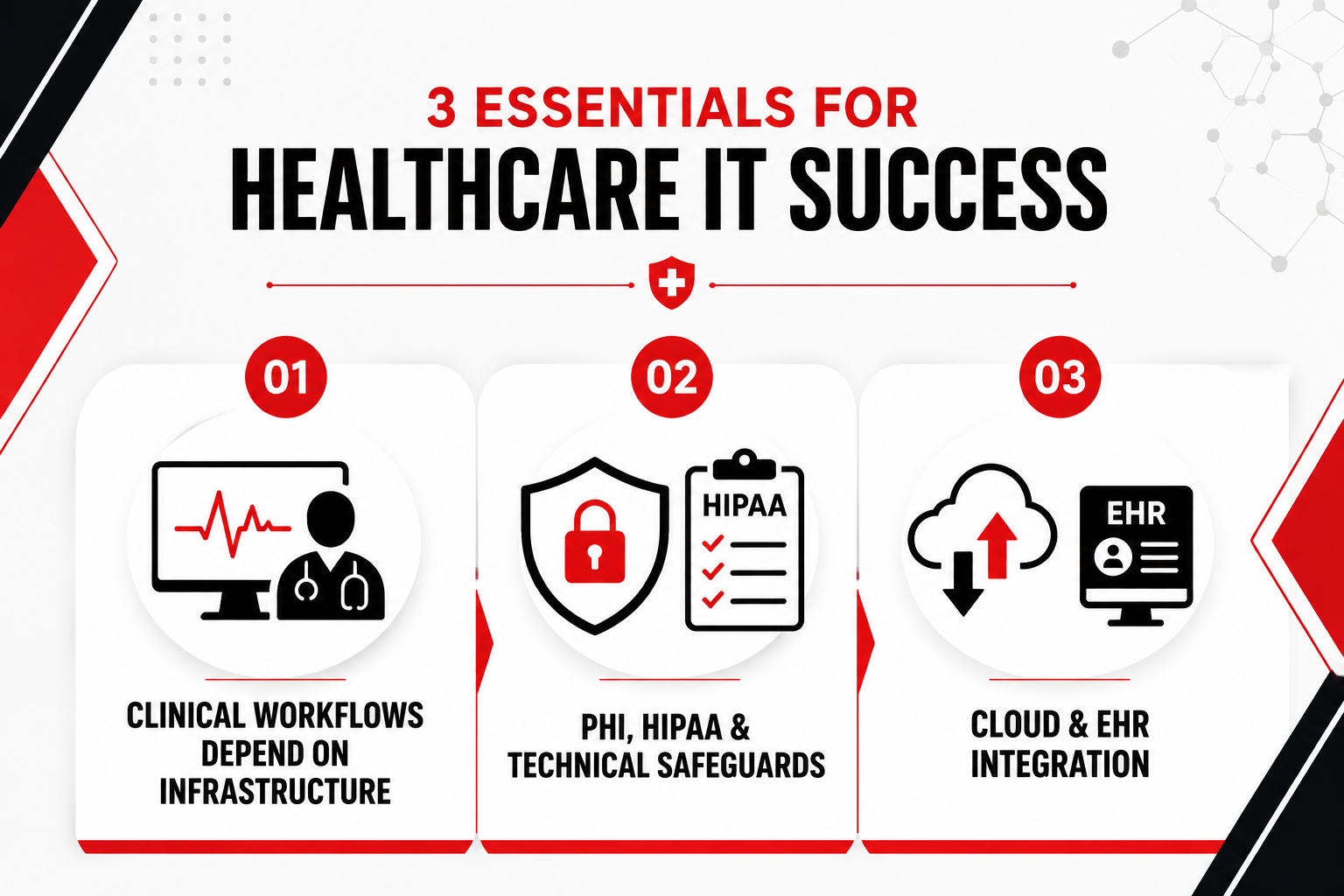
Clinical Workflows Depend on Invisible Infrastructure

When a clinician orders a lab test, the request travels through multiple systems: the EHR, an interface engine, the lab information system, and back. If any link in that chain is slow, misconfigured, or down, the result is delayed care, frustrated clinicians, and potential patient harm. Imaging systems, medication dispensing, patient monitoring devices, and telehealth platforms all rely on network infrastructure that IT teams design, secure, and maintain.

A healthcare IT checklist ensures that infrastructure decisions are evaluated not just for technical performance but for their impact on patient throughput, clinician efficiency, and care quality. Slow Wi-Fi in an exam room, insufficient bandwidth for imaging transfers, or a misconfigured VLAN that blocks EHR access can all create clinical bottlenecks that IT must identify and resolve.

PHI, HIPAA, and Technical Safeguards

The HIPAA Security Rule requires covered entities to implement technical safeguards that protect electronic protected health information. These safeguards include access control (unique user IDs, emergency access procedures, automatic logoff, encryption), audit controls (logging and monitoring of PHI access), integrity controls (mechanisms to confirm PHI has not been altered or destroyed), and transmission security (encryption and integrity controls for PHI in transit). A healthcare IT checklist translates these regulatory requirements into specific, testable criteria:

  • Access Control: Verify that EHR and health apps enforce role-based access, require strong authentication, and automatically log off inactive sessions in clinical areas.

  • Audit Controls: Confirm that all systems handling PHI generate logs, that logs are centrally collected and retained per policy, and that security teams review logs for unauthorized access or anomalies.

  • Integrity Controls: Ensure that backups, EHR databases, and transmitted health information include checksums or digital signatures to detect tampering.

  • Transmission Security: Validate that PHI moving between systems, to cloud services, or over wireless networks is encrypted using current protocols (TLS 1.2 or higher, WPA3 for Wi-Fi).

Cloud and EHR Integration Are Now Baseline

EHR systems exchange data with labs, imaging centers, pharmacies, and health information exchanges. Patient portals and mobile health apps give patients direct access to their records, test results, and secure messaging with providers. Cloud services host backups, analytics platforms, and increasingly, core clinical applications. Each integration point and cloud service introduces new security and interoperability challenges that IT must evaluate.

A healthcare IT checklist must include criteria for assessing vendor security, validating Business Associate Agreements, confirming secure API integrations, and ensuring that third-party health apps meet the same PHI protection standards as internal systems. Interoperability is no longer a future goal; it is a daily operational requirement that IT must support with secure, reliable infrastructure.

Read Next:

Primary Healthcare IT Infrastructure Checklist

Healthcare organizations must evaluate infrastructure across network design, identity controls, EHR integrations, wireless performance, and operational monitoring. Each area requires specific, testable criteria that address clinical operations, PHI security, and HIPAA technical safeguards. What follows is organized by system area, with concrete evaluation criteria IT teams can use to document the current state, identify gaps, and build a remediation plan.

Network and Infrastructure Foundation for Clinical Workflows

Clinical applications, imaging transfers, and remote access depend on network infrastructure that most clinicians never see. Poor segmentation, insufficient bandwidth, or missing redundancy creates delayed lab results, frozen EHR screens, and clinicians reverting to paper workarounds. Guest traffic must be isolated from EHR systems, medical devices need dedicated network zones, and critical paths require failover configurations.

  • Verify network segmentation: Confirm that EHR systems, guest Wi-Fi, biomedical devices, and administrative networks operate on separate VLANs with firewall rules that prevent lateral movement between zones.

  • Ensure redundancy for critical paths: Validate that switches, routers, and internet connections serving EHR, imaging, and lab systems have redundant links or failover configurations to prevent single points of failure.

  • Confirm bandwidth and QoS policies: Check that clinical applications (EHR, PACS, VoIP) are prioritized over guest and administrative traffic, and that bandwidth is sufficient for peak usage periods.

  • Secure remote access: Verify that VPN or zero-trust access solutions require multi-factor authentication, enforce role-based access, and log all remote sessions for audit purposes.

  • Evaluate data center and cloud design: Confirm that on-premise servers and cloud services hosting PHI are geographically redundant, backed up regularly, and protected by encryption at rest and in transit.

  • Document network topology: Ensure that current network diagrams, VLAN assignments, firewall rules, and IP address schemes are documented and accessible to IT staff for troubleshooting and audits.

Securing PHI: Identity, Access, and Endpoint Controls

Every workstation, mobile device, and remote session represents a potential path to protected health information. Controlling who accesses clinical systems, from which devices, and under what conditions is fundamental to HIPAA technical safeguards. Role-based access must limit permissions to what each user needs, endpoints must be hardened and encrypted, and privileged accounts require additional scrutiny and logging.

  • Enforce single sign-on and multi-factor authentication: Verify that clinicians, staff, and administrators use SSO to access EHR and health apps, with MFA required for remote access and privileged accounts.

  • Implement role-based access controls: Confirm that EHR and clinical systems grant access based on job role, department, and shift, with automatic access reviews and revocation when staff leave or change roles.

  • Harden workstations and mobile devices: Ensure that all endpoints accessing PHI run current operating systems, have endpoint protection enabled, enforce full-disk encryption, and disable unnecessary services.

  • Configure session timeouts: Validate that EHR and clinical applications automatically log off inactive sessions after a defined period (typically 5-15 minutes in clinical areas) to prevent unauthorized access.

  • Secure portable and mobile devices: Confirm that laptops, tablets, and smartphones used by clinicians are encrypted, require strong authentication, and can be remotely wiped if lost or stolen.

  • Review privileged access: Verify that administrative accounts for EHR, network devices, and servers are limited to authorized IT staff, require MFA, and are logged and monitored for unusual activity.

EHR, Clinical Systems, and Interoperability Checklist

Electronic health records work in cohesion with other healthcare systems. Lab orders, imaging requests, patient portal access, and third-party health apps all depend on secure, reliable data flows between systems. When an interface fails, labs go unordered, and clinicians waste time on manual workarounds. When a patient portal lacks proper authentication, PHI becomes accessible to unauthorized users.

Evaluating EHR integration requires verifying that data flows work correctly, failures trigger alerts, and every system touching PHI meets the same security standards as the EHR itself.

Checklist Area Target Sale Description Priority (High/Med/Low)
EHR-Lab Integration Orders and results are exchanged electronically without manual re-entry; the interface engine monitors for failures. High
EHR-Imaging (PACS) Integration Imaging orders sent electronically; results and images accessible within EHR without separate login. High
Interface Engine Monitoring Automated alerts notify IT and clinical staff when interfaces fail, with escalation for delays affecting patient care. High
Patient Portal Security MFA enabled for patient login; secure messaging encrypted; PHI access logged and auditable. High
Third-Party Health App Integrations All apps accessing EHR data via API have current Business Associate Agreements, security reviews, and documented data flows. High
Health Information Exchange (HIE) Connectivity Secure, encrypted connections to regional or national HIEs; data exchange logged and monitored. Meidum
API Security and Rate Limiting EHR APIs require OAuth or similar authentication; rate limits prevent abuse; API access is logged. Medium
Interoperability Testing Regular testing confirms that HL7, FHIR, or other integration protocols function correctly after EHR updates or vendor changes. Medium

Wireless, IoT, and Clinical Device Connectivity

Wireless networks in healthcare serve three distinct groups: clinicians who need secure access to EHR and clinical applications, patients and visitors who expect guest Wi-Fi, and IoT and medical devices that often ship with weak security. When these groups share the same network, risk increases quickly. A compromised guest device may create a path toward internal systems, while an unpatched infusion pump or connected clinical device can become an entry point for ransomware.

Clinical Wi-Fi should use WPA3 or WPA2-Enterprise with 802.1X authentication tied to individual user accounts, rather than shared pre-shared keys. Guest Wi-Fi should be placed on separate VLANs and blocked from accessing internal resources. IoT and medical devices should also sit in dedicated network segments, with firewall rules that allow communication only with the systems they actually need.

Security, however, is only part of the requirement. Coverage and capacity directly affect care delivery. Dead zones in exam rooms, treatment areas, or operating spaces can interrupt workflows, delay access to clinical applications, and create issues that IT may not discover until they become serious. Regular site surveys help identify weak coverage, interference, and capacity constraints before they affect patient care.

Device onboarding also needs clear controls. Certificate-based access control, and MAC-based controls where appropriate, help ensure that only authorized devices can join the network. Changes to SSID names, passwords, authentication settings, or wireless configurations should follow formal change control, so routine updates do not create avoidable outages.

Monitoring, Logging, and Patch Management for Healthcare IT

Detecting incidents early and reducing the attack surface requires consistent operational discipline. Healthcare IT teams often struggle to maintain that discipline when logs, alerts, vulnerabilities, and patches are spread across systems with different owners and uptime requirements. Centralized logging, tuned alerting, regular vulnerability scanning, and coordinated patch management help teams reduce risk before issues turn into incidents.

  • Centralize log collection: Verify that logs from EHR systems, firewalls, switches, wireless controllers, servers, and endpoint protection are sent to a central SIEM or log management platform for correlation and analysis.

  • Configure security event alerting: Ensure that the SIEM or monitoring system generates alerts for high-risk events such as failed login attempts, privilege escalation, firewall rule changes, and unauthorized PHI access.

  • Monitor clinical system availability: Confirm that uptime monitoring covers EHR, interface engines, imaging systems, and patient portals, with automated alerts and escalation procedures for outages affecting patient care.

  • Conduct regular vulnerability scanning: Schedule authenticated scans of servers, network devices, and endpoints to identify missing patches, misconfigurations, and known vulnerabilities, with results reviewed and prioritized by IT.

  • Coordinate patch management with clinical schedules: Verify that patches for EHR, clinical applications, and infrastructure are tested in a non-production environment, then deployed during maintenance windows that minimize disruption to patient care.

  • Document change control procedures: Ensure that all infrastructure changes (firewall rules, network configurations, software updates) are documented, approved, and logged to support audits and troubleshooting.

  • Test disaster recovery plans: Confirm that backups of EHR and clinical systems are tested regularly, that recovery procedures are documented, and that IT staff are trained to restore systems within defined recovery time objectives.

Read Next: Common Network Security Threats: How to Mitigate Cyber Attacks and Vulnerabilities

Turn Checklist Findings Into a Practical Action Plan

Completing the healthcare IT checklist will surface dozens of findings, from critical PHI exposure risks to lower-priority configuration improvements. The next step is to transform those findings into a prioritized, time-bound remediation roadmap that aligns with clinical operations, compliance deadlines, and available resources.

Turn Checklist Findings Into a Practical Action Plan

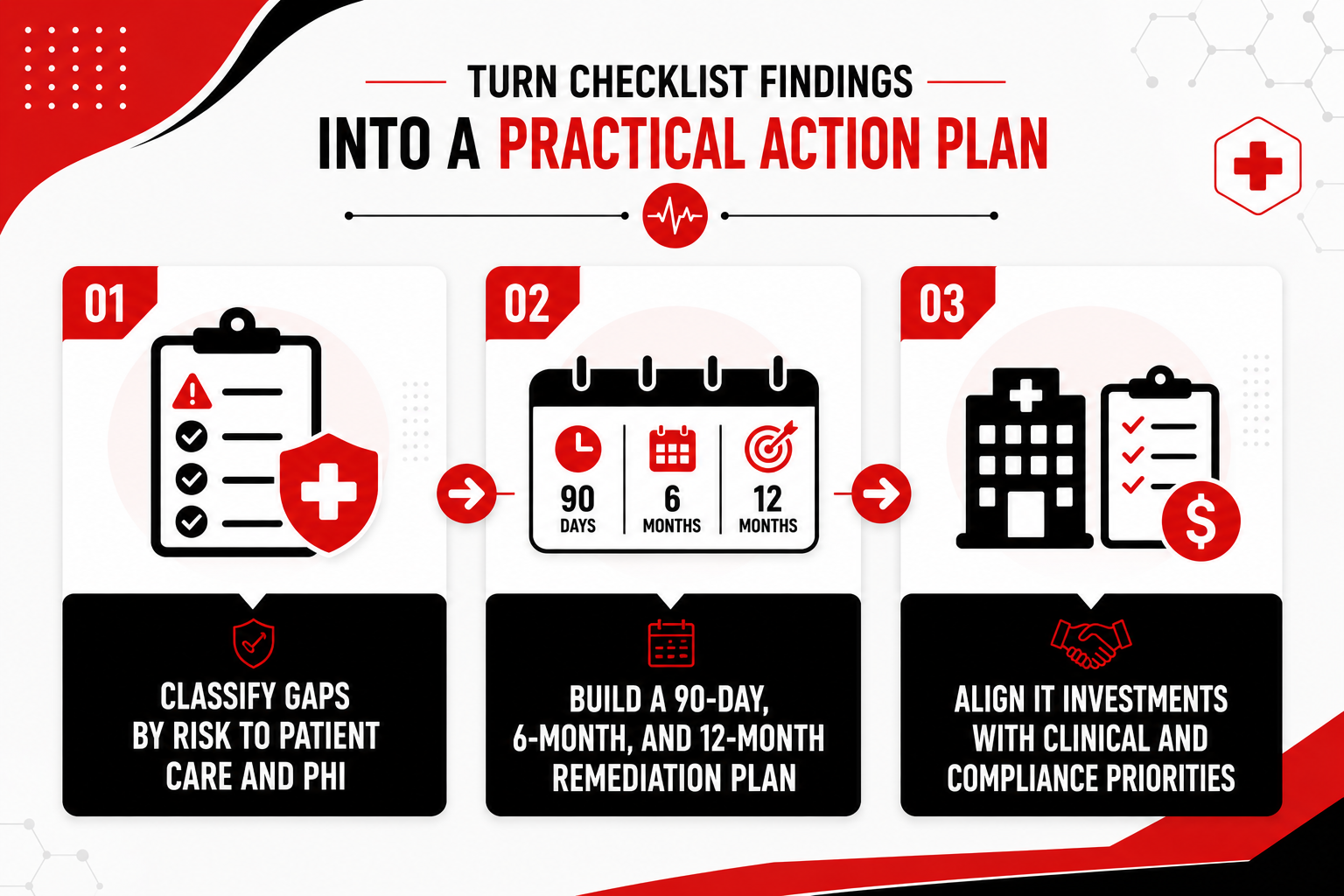
Classify Gaps by Risk to Patient Care and PHI

Not all checklist findings require the same level of urgency. A missing firewall rule that exposes PHI to the internet needs immediate action, while incomplete network topology documentation may be important without being urgent.

To prioritize effectively, rate each finding by its impact on clinical workflows and PHI security. The first question is whether the gap could cause downtime, delays, or patient safety issues. The second is whether it creates a path for unauthorized access, data theft, or ransomware.

Use a simple priority structure to turn those ratings into action. Critical findings should be addressed within days or weeks. High-priority findings should move into the next 90-day plan. Medium-priority items can be scheduled over the next six months, while low-priority findings can become longer-term improvements.

This approach helps IT teams focus limited time and budget on the gaps that create the greatest risk to patient care, PHI, and regulatory compliance.

Build a 90-Day, 6-Month, and 12-Month Remediation Plan

Once findings are classified, organize them into a phased remediation plan that balances urgency, complexity, and resource availability. The structure below provides a practical framework for turning checklist results into action.

  • 0-90 days (critical and high-priority): Address findings that directly expose PHI or disrupt clinical workflows. Examples include encrypting unencrypted PHI at rest, segmenting guest Wi-Fi from EHR networks, enabling MFA for remote access, fixing failed EHR interfaces, and deploying missing endpoint protection on clinician workstations.

  • 6 months (medium-priority): Tackle findings that improve security posture, operational efficiency, or compliance readiness but do not pose immediate risk. Examples include centralizing log collection into a SIEM, conducting wireless site surveys to optimize coverage, implementing automated vulnerability scanning, and documenting disaster recovery procedures.

  • 12 months (low-priority and strategic improvements): Plan longer-term infrastructure upgrades and process improvements. Examples include replacing aging network switches, upgrading structured cabling to support higher bandwidth, deploying advanced analytics for clinical system performance, and expanding interoperability with regional health information exchanges.

Align IT Investments With Clinical and Compliance Priorities

Every remediation initiative competes for budget, staff time, and clinical tolerance for change. The table below helps IT leaders evaluate and prioritize initiatives based on their impact on patient care, compliance, and implementation effort.

Initiative Clinical Impact Compliance/Security Impact Effort Level
Encrypt PHI at Rest in EHR Backups Protects patient data in disaster recovery scenarios; reduces breach notification risk. Directly supports HIPAA technical safeguards; reduces OCR penalty exposure. Medium
Segment Guest Wi-Fi from EHR VLANs Reduces risk of lateral movement from compromised guest devices to clinical systems. Lowers the likelihood of PHI exposure; supports network access control requirements. Low
Centralize Log Collection and Deploy SIEM Faster detection of security incidents and unauthorized PHI access; supports forensic investigations. Strengthens HIPAA audit controls; provides evidence for compliance audits. Medium
Implement MFA For All Remote EHR Access Prevents credential theft from enabling unauthorized PHI access; reduces ransomware entry points. Addresses primary attack vector in recent healthcare breaches; supports access control safeguards. Low
Conduct a Wireless Site Survey and Optimize Coverage Eliminates dead zones that force clinicians to use workarounds; improves clinician satisfaction and efficiency. Ensures secure, reliable connectivity for mobile devices accessing PHI. Medium
Replace Aging Network Switches and Upgrade Cabling Increases bandwidth for imaging and EHR; reduces unplanned outages from hardware failures. Supports long-term scalability and reliability; reduces risk of downtime affecting patient care. High
Deploy Automated Vulnerability Scanning and Patch Management Reduces attack surface by identifying and remediating known vulnerabilities before exploitation. Addresses the primary cause of healthcare breaches; supports integrity and access control safeguards. Medium

Read Next: Building a Network Disaster Recovery Plan: Protecting Your Business Against Interruptions

Secure Clinical IT for Better Patient Outcomes

The healthcare IT infrastructure checklist gives IT teams a structured, actionable framework to evaluate network security, EHR integration, wireless performance, endpoint controls, and monitoring capabilities. By working through each section, IT leaders can identify critical gaps in PHI protection, clinical system reliability, and HIPAA compliance, then build a prioritized remediation roadmap that aligns with clinical operations and regulatory deadlines.

  • Prioritize PHI and clinical uptime: Fix encryption gaps, network segmentation issues, and EHR integration failures before addressing lower-impact configuration improvements.

  • Turn findings into a roadmap: Use risk-based timelines (90-day, 6-month, 12-month) to organize remediation efforts and demonstrate measurable progress to leadership and auditors.

  • Revisit the checklist regularly: The checklist is a repeatable tool for internal audits, infrastructure upgrades, and new technology integrations to maintain security and compliance over time.

With experience supporting healthcare networks where secure, reliable infrastructure directly enables patient care and clinical operations, Turn-Key Technologies helps IT teams strengthen defenses against cyber threats targeting healthcare organizations. Talk to a healthcare IT expert to prioritize your checklist gaps and design a secure, scalable roadmap for your clinical environment.

FAQs

What should be included in a healthcare IT infrastructure checklist?

A healthcare IT checklist should cover network segmentation, access controls, PHI encryption, EHR integrations, wireless and IoT security, logging, patch management, and disaster recovery. Each item should be specific, testable, and tied to HIPAA safeguards and clinical workflow needs.

How does a healthcare IT checklist support HIPAA security and technical safeguards?

A checklist turns HIPAA technical safeguards into practical review points. It helps IT teams verify access controls, audit logging, encryption, session timeouts, MFA, and data integrity controls while identifying gaps that may affect compliance.

How often should healthcare organizations audit their clinical IT environment?

Healthcare organizations should complete a full infrastructure audit at least once a year. High-risk areas such as access controls, patching, EHR integrations, and logging should be reviewed more often, especially after major system changes or incidents.

What are the most common gaps found in healthcare infrastructure audits?

Common gaps include weak MFA, poor network segmentation, unencrypted PHI, delayed patching, insufficient logging, failed EHR interfaces, and disaster recovery plans that have not been tested. Many of these issues come from resource limits or unclear ownership.

How do we evaluate cloud vendors' handling of electronic health records and PHI?

Cloud vendors should sign a Business Associate Agreement, encrypt PHI, enforce strong access controls, provide audit logs, document incident response procedures, and show evidence of security compliance, such as SOC 2 Type II or HITRUST.

How can IT improve interoperability between EHR systems and other healthcare apps?

IT teams can improve interoperability by using secure standards such as FHIR, enforcing strong API authentication, monitoring interface failures, logging data exchanges, and reviewing third-party apps before they access EHR data.

What security measures are critical for Wi-Fi and IoT devices in clinics?

Clinical Wi-Fi, guest Wi-Fi, and IoT or medical device networks should be separated using VLANs and firewall rules. Clinical Wi-Fi should use WPA3 or WPA2-Enterprise, and only authorized devices should be allowed to connect.

How do we prioritize remediation after completing a healthcare IT checklist?

Prioritize findings by risk to patient care and PHI. Critical issues need immediate action, high-priority items should be addressed within 90 days, medium-priority items can be scheduled within six months, and lower-risk improvements can move into a longer-term plan.