




Skip to the main content.

10 min read

Data Center Cabling Design: What Northeast Facilities Should Get Right Before Installation

Written by Updated July 31, 2026
Picture of Tony Ridzyowski
Tony Ridzyowski

Tony Ridzyowski leads the Inside Sales Team at Turn-key Technologies, Inc., where he also supports marketing, partner strategy, training, and CRM operations. Since joining TTI in 2014, Tony has earned top producer honors and President’s Club recognition. With a background in network cabling and experience working with Fortune 500 clients like Wells Fargo and Countrywide Home Loans, Tony brings decades of industry insight to every customer conversation.

Data Center Cabling Design: What Northeast Facilities Should Get Right Before Installation

Designing data center cabling for a Northeast facility starts with the physical layout. Planning the fiber and copper architecture, pathway capacity, rack density, testing requirements, and room for future expansion before installation helps reduce rework and makes the infrastructure easier to maintain as network demands grow. In existing buildings across New York, New Jersey, and Pennsylvania, limited riser space, legacy pathways, and crowded equipment rooms often influence those decisions long before the first cable is installed.

Capacity planning deserves careful attention. Research published by the Fiber Broadband Association in 2025 projects that U.S. hyperscale data center capacity will at least triple by 2029, requiring interfacility fiber infrastructure to grow from 159 million to 373 million fiber miles.

Although the study focuses on connections between data centers, it reflects the broader increase in bandwidth and connectivity that organizations should consider when designing internal cabling systems. Infrastructure sized only for current demand may require new backbone cabling, pathway modifications, or disruptive upgrades sooner than expected.

This guide explains how to design a structured cabling system that supports reliable operations today while making future expansion, maintenance, and technology upgrades easier to manage.

💡 TL;DR: Data Center Cabling Design Priorities

Before designing or upgrading a data center cabling system, keep these priorities in mind:

  • Plan the cable plant before selecting hardware. Rack layouts, cable pathways, and backbone routes should be established before installation begins.
  • Match the cabling to the application. Use fiber and copper where they make the most sense based on bandwidth, distance, device connectivity, and future requirements.
  • Allow capacity for growth. Reserve pathway space, backbone capacity, and rack infrastructure to accommodate future expansion without major reconstruction.
  • Prioritize cable management. Organized routing, proper bend radius, and consistent labeling simplify maintenance and reduce troubleshooting time.
  • Test and document every installation. Certification testing, accurate labeling, and up-to-date documentation make future changes faster and help maintain network reliability.
  • Design for the facility, not just the equipment. Existing buildings often have structural limitations that should influence pathway design, equipment placement, and installation methods.

Why Data Center Cabling Design Begins Long Before Installation

Most installation challenges can be traced back to planning decisions made weeks or months earlier. Before cable is pulled, the project team should already know how the backbone will be routed, where racks and equipment will be located, how pathways will be used, and how the infrastructure will be tested and documented.

Taking the time to resolve these decisions early reduces field changes, helps avoid pathway congestion, and makes future maintenance and expansion much easier. This is especially important in existing Northeast facilities, where limited space and legacy infrastructure often restrict installation options.

Design Decisions to Finalize Before Installation

Before Installation Why It Matters
Rack Locations and Equipment Layout Prevents cable congestion and supports efficient airflow and maintenance.
Backbone and Horizontal Cable Routes Reduces unnecessary cable lengths and simplifies future expansion.
Fiber and Copper Media Selection Matches bandwidth, distance, and application requirements.
Pathway and Conduit Capacity Leaves room for future growth without replacing existing infrastructure.
Labeling, Testing, and Documentation Standards Ensures the installation can be verified, maintained, and modified efficiently.

Organizations planning new installations or infrastructure upgrades often benefit from working with a provider that offers both network design and structured cabling installation services. Learn more about Turn-Key Technologies' Structured Cabling Services.

Read Next: Structured Cabling Installation Checklist: What to Verify Before Deployment

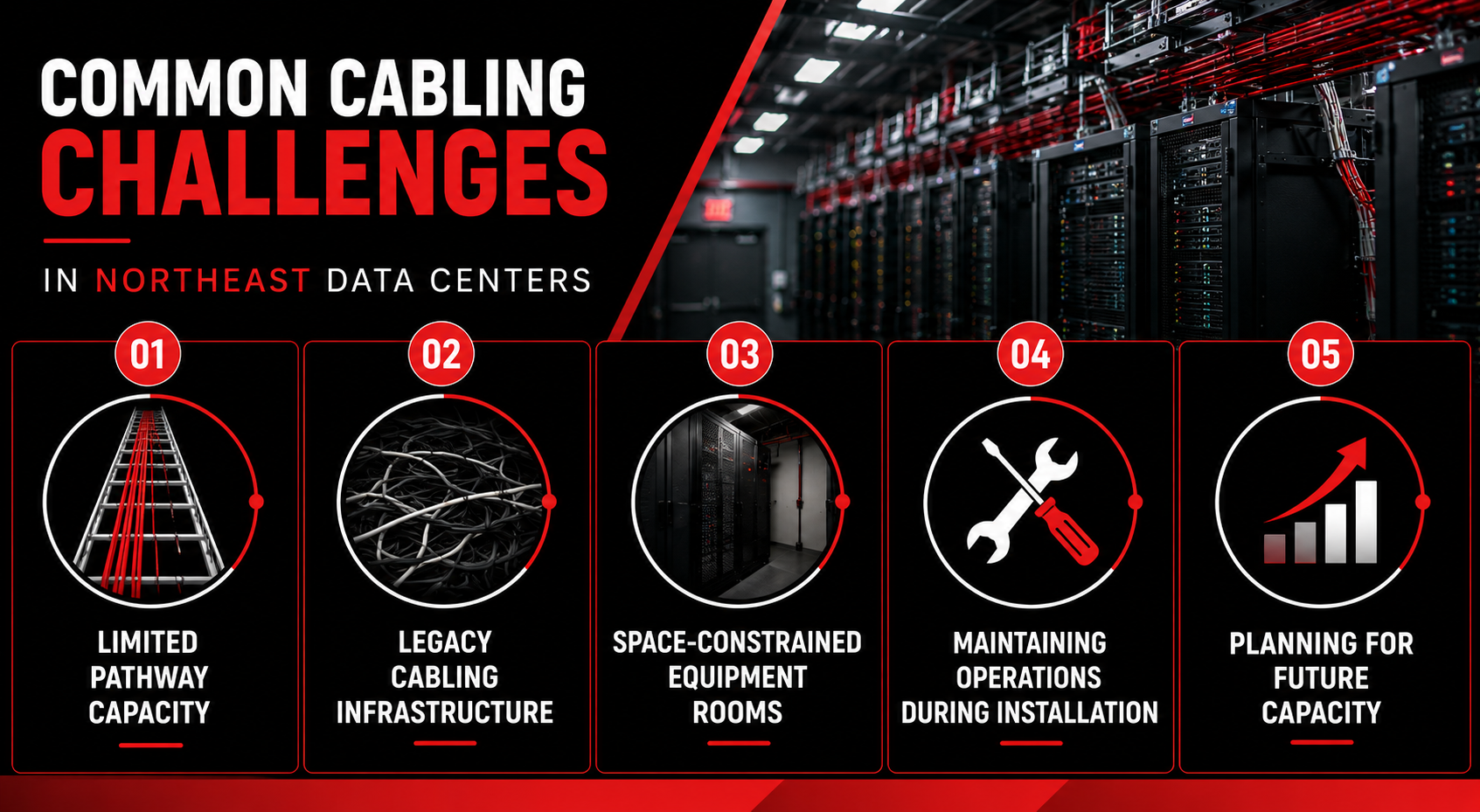
Common Cabling Challenges in Northeast Data Centers

Designing structured cabling for a Northeast data center often means working within the constraints of an existing facility rather than a purpose-built environment. Older buildings, active operations, and limited infrastructure can all influence how the cabling system is designed and installed. Identifying these conditions early helps reduce installation delays and minimizes the need for costly changes later in the project.

  1. Limited pathway capacity: Existing cable trays, conduits, and risers may already be close to capacity, leaving little room for additional fiber or copper cabling. Evaluating available pathway space early helps determine whether existing infrastructure can support future growth or if new pathways should be included in the project scope.

  2. Legacy cabling infrastructure: Many facilities still operate with older fiber and copper systems that support critical applications. Integrating new cabling with existing infrastructure often requires phased migrations, careful documentation, and planning that minimizes service interruptions.

  3. Space-constrained equipment rooms: Smaller telecommunications rooms and densely populated racks can make cable routing more difficult and reduce access for future maintenance. Planning rack layouts, cable managers, and service clearances before installation helps improve both accessibility and airflow.

  4. Maintaining operations during installation: Many Northeast projects take place in hospitals, schools, warehouses, and enterprise facilities that cannot afford extended downtime. Installation schedules, cable routing, and migration plans often need to be coordinated around normal business operations to reduce disruption.

  5. Planning for future capacity: Data center requirements rarely remain static. Reserving pathway space, backbone capacity, and rack locations for future expansion makes it easier to support higher bandwidth, additional equipment, and new technologies without rebuilding large portions of the cable plant.

These challenges vary from one facility to another, but they all reinforce the same principle: the earlier site constraints are identified during the design phase, the easier it becomes to build a structured cabling system that supports both current operations and future growth.

Read More: Structured Cabling Expansion Guide: Planning for Future Growth

Choosing the Right Fiber and Copper Cabling Strategy

Selecting fiber or copper should be based on where the connection runs, how much bandwidth it needs, whether the device requires power, and how the link may change over time.

Fiber optic cabling is commonly used for backbones, longer runs, and high-capacity inter-rack connections. Copper remains practical for shorter equipment links, management networks, and devices that require Power over Ethernet. Most data center designs use both, with each medium assigned according to distance, bandwidth, power, and maintenance requirements.

Where Fiber and Copper Fit

Design Factor Fiber Optic Cabling Copper Cabling
Typical Role Backbone, inter-rack, uplink, and high-capacity connections Server, endpoint, management, and short equipment connections
Distance Preferred for longer runs and connections between rooms or buildings Best suited to shorter channel distances
Bandwidth Growth Provides greater headroom for higher-speed network upgrades Performance depends on cable category, distance, and application
Power Delivery Does not deliver power to connected devices Supports Power over Ethernet for cameras, access points, sensors, and other devices
Electromagnetic Interference Immune to electromagnetic interference May require additional planning near power equipment and other interference sources
Installation Charges Well suited to planned, high-capacity links with a long service life Often easier to patch, reconfigure, and support with common field tools
Most Practical Choice High-speed backbones, longer distances, dense interconnects, and capacity expansion Short device runs, PoE applications, and equipment connections with predictable bandwidth needs

The final mix should reflect the facility’s current architecture and expected growth. A data center planning higher rack densities may install additional fiber strands during the initial build to avoid opening pathways again later. A smaller enterprise environment may rely more heavily on copper for device connectivity while reserving fiber capacity for backbone expansion.

The goal is to place each medium where it performs best and avoid redesigning the cable plant when bandwidth, equipment density, or redundancy requirements increase. Selecting the right media is only one part of a successful deployment.

Selecting the right fiber and copper media is only one part of a successful deployment. Proper installation, testing, and long-term scalability are equally important. Learn how Turn-Key Technologies' Structured Cabling Services help organizations design and deploy reliable cabling infrastructure for current requirements and future growth.

Read Next: Cabling Pathways and Routing Design Best Practices

Planning a Data Center Cabling Project?


Designing Backbone and Horizontal Cabling

Once the fiber and copper strategy is defined, the next step is deciding how cabling will move through the facility. Backbone cabling connects major network spaces, such as entrance facilities, main distribution areas, horizontal distribution areas, and telecommunications rooms. Horizontal cabling extends from those distribution points to racks, cabinets, and connected equipment.

The design should keep backbone routes direct, accessible, and separate from congested equipment-level cabling wherever possible. Redundant links may also require physically diverse pathways so a single damaged tray, conduit, or riser does not interrupt both connections.

Horizontal cabling should be organized around rack placement and equipment density. Long or indirect routes consume pathway capacity, complicate cable management, and make future changes harder to trace. Using overhead or underfloor pathways consistently, maintaining bend radius, and providing dedicated entry points into racks helps keep the installation serviceable.

Several decisions should be resolved before routes are finalized:

  • Distribution locations: Place connection points where they can serve equipment efficiently without creating excessive cable lengths.

  • Pathway capacity: Account for cable fill, separation requirements, maintenance access, and planned additions.

  • Route diversity: Use separate physical paths where redundancy requirements justify the added infrastructure.

  • Transition points: Define where backbone cabling terminates, and horizontal distribution begins.

  • Accessibility: Keep trays, conduits, patch panels, and service loops reachable without moving active equipment.

A clear backbone and horizontal design gives installers defined routes to follow and reduces the risk of congested pathways, inconsistent routing, or difficult-to-maintain cable runs. Because backbone architecture directly affects overall network performance, many organizations coordinate their cabling design alongside their Wired Network Infrastructure to ensure both systems are designed as a single solution.

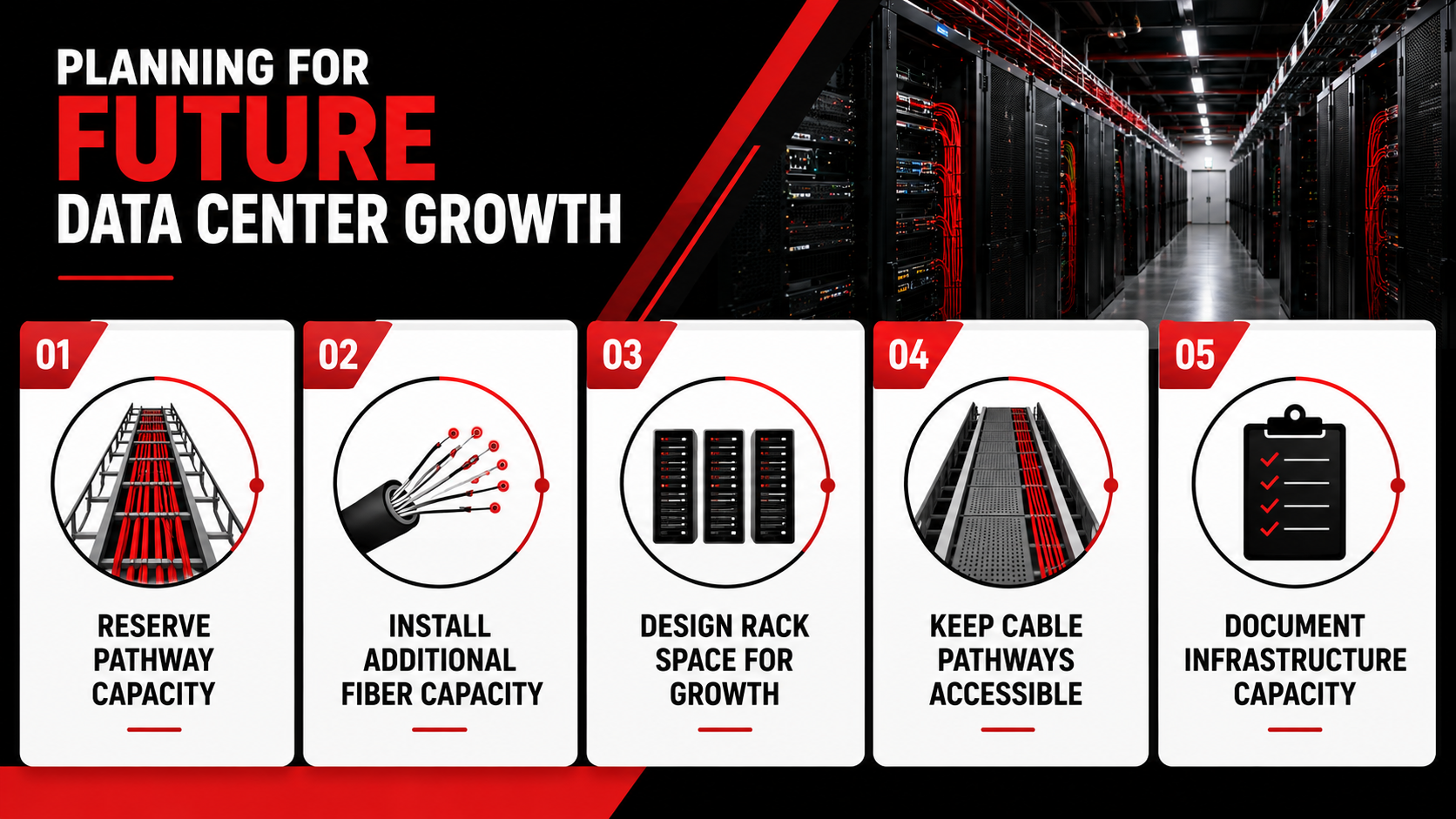
Planning for Future Data Center Growth

Most structured cabling systems remain in service far longer than the switches, servers, and storage equipment they support. While active hardware may be replaced every few years, the underlying cable plant is often expected to accommodate multiple technology refreshes. Designing only for current requirements can lead to congested pathways, limited backbone capacity, and disruptive infrastructure upgrades as network demands increase.

Planning for future growth does not mean installing every possible cable on day one. It means making design decisions that allow additional capacity to be added with minimal disruption to the existing environment.

Building additional capacity into today's cabling infrastructure can significantly reduce the cost and disruption of future expansions. Turn-Key Technologies helps organizations design scalable Structured Cabling Systems that support long-term growth.

1. Reserve Pathway Capacity

Cable trays, conduits, sleeves, and risers should be designed with future growth in mind rather than filled to their practical limits during the initial installation. Leaving available pathway capacity makes it easier to install additional fiber and copper cabling without replacing existing infrastructure or creating routing challenges later. This consideration is particularly important in older Northeast facilities, where expanding physical pathways is often more difficult than installing new network equipment.

2. Install Additional Fiber Capacity

Installing spare fiber strands during the initial build is often more cost-effective than adding new backbone cabling after the facility becomes operational. Extra fiber capacity can support higher-speed network upgrades, additional distribution switches, storage expansion, or new inter-rack connections without requiring new pathway construction or extended downtime.

3. Design Rack Space for Growth

Rack layouts should account for more than today's equipment requirements. Reserving space for additional patch panels, cable managers, and network hardware provides flexibility as infrastructure evolves. Overcrowded racks make future installations more difficult and increase the time required for maintenance, upgrades, and troubleshooting.

4. Keep Cable Pathways Accessible

A well-designed cable pathway should remain serviceable long after the project is complete. Technicians should be able to add, remove, or replace cabling without dismantling existing installations or disrupting adjacent systems. Consistent routing, proper cable management, and adequate access around trays, patch panels, and equipment all contribute to easier long-term maintenance.

5. Document Available Infrastructure Capacity

Documentation should capture more than the cabling that has been installed. Recording available pathway space, unused fiber strands, spare patch panel ports, and remaining rack capacity gives future project teams a clear understanding of the infrastructure already in place. These records reduce unnecessary site surveys and help organizations expand the network using existing resources whenever possible.

Designing for future growth helps organizations extend the life of their structured cabling investment. By reserving physical capacity and documenting the infrastructure from the outset, data centers can accommodate new technologies, higher bandwidth demands, and additional equipment without rebuilding major portions of the cable plant.

Read Next: Structured Cabling Expansion Guide: Planning for Future Growth

Verifying and Documenting the Installation

A structured cabling system is only as effective as the documentation and testing that support it. Even a well-designed installation becomes more difficult to maintain if cables cannot be identified, certification results are unavailable, or infrastructure records are incomplete.

Completing these tasks before the project is turned over helps establish a reliable baseline for future maintenance, troubleshooting, and expansion.

Verify Installation Performance

Every installed cable should be tested to confirm it meets the required performance standards before being placed into service. Fiber optic cabling is typically tested for continuity and optical loss, while copper cabling is certified against the appropriate performance category. These results help identify installation issues early and provide documented proof that the cabling system was installed as designed.

Use a Consistent Labeling Standard

Clear and consistent labeling makes future maintenance significantly easier. Patch panels, cables, racks, and termination points should follow a standardized naming convention that allows technicians to quickly identify connections without tracing cables through the facility. Consistency becomes even more valuable as equipment is added, relocated, or replaced over time.

Maintain Accurate Project Documentation

Project documentation should reflect the final installation rather than the original design drawings. As-built documentation typically includes cable schedules, certification reports, rack elevations, pathway diagrams, and updated floor plans showing the completed infrastructure. Keeping these records current helps future project teams understand the existing environment before planning upgrades or expansions.

Treat Documentation as an Operational Asset

Documentation should continue to evolve after installation is complete. Recording infrastructure changes as they occur helps prevent discrepancies between the physical installation and project records. Current documentation reduces troubleshooting time, simplifies capacity planning, and provides engineers with reliable information when future modifications are required.

A structured cabling project does not end when the last cable is terminated. Thorough testing, consistent labeling, and accurate documentation help ensure the infrastructure remains reliable, maintainable, and ready to support future technology upgrades throughout its service life.

Read More: Structured Cabling Color Coding Standards

Is Your Data Center Cabling Ready for Growth?

Most data centers already have a structured cabling system in place. The more important question is whether that infrastructure can support future growth, simplify maintenance, and accommodate new technologies without requiring major redesign.

A well-planned cabling system provides more than reliable connectivity. It creates a foundation for efficient upgrades, easier maintenance, and long-term operational performance.

Key Takeaways

  • Plan the cabling system before installation begins.

  • Select fiber and copper cabling based on application requirements, distance, and future scalability.

  • Design backbone and horizontal cabling to support efficient routing, accessibility, and long-term growth.

  • Reserve pathway capacity, spare fiber, and rack space to simplify future expansion.

  • Verify every installation through testing, consistent labeling, and accurate documentation.

If you're planning a new data center or upgrading an existing facility, reviewing the cabling design before installation can uncover issues that are significantly more difficult and costly to correct later.

Turn-Key Technologies provides Structured Cabling and Wired Network solutions for organizations throughout New York, New Jersey, and Pennsylvania. Our team designs and installs copper and fiber cabling infrastructure, delivering end-to-end solutions from initial planning and installation through testing and ongoing support to support long-term performance and future growth.

Planning a data center cabling project? Contact Turn-Key Technologies to discuss your structured cabling and network infrastructure requirements.

Build a Data Center Cabling System That Supports Long-Term Growth


Frequently Asked Questions

What are the most important data center cabling best practices?

Effective data center cabling begins with thoughtful planning rather than installation. Some of the most important data center cabling best practices include selecting the right cabling for the application, designing scalable backbone and horizontal pathways, following recognized cabling standards, maintaining organized cable management, testing every installed cable, and keeping accurate documentation throughout the lifecycle of the cabling infrastructure.

What types of data center cabling are commonly used?

The two primary types of data center cabling are fiber optic and copper cabling. Fiber is typically used for backbone connections, high-speed data transmission, and long-distance data transmission, while copper cabling supports shorter equipment connections and Power over Ethernet (PoE). Choosing the right cabling depends on bandwidth requirements, transmission distance, equipment density, and future scalability.

Why is cable management important in a data center?

Effective data center cable management improves airflow, simplifies maintenance, reduces troubleshooting time, and lowers the risk of accidental cable damage. Well-organized pathways also make it easier for technicians to install additional data cabling as network requirements grow. Poor cable management can increase operational complexity and make future upgrades more difficult.

Which cabling standards should a data center follow?

Most organizations design their data center cabling infrastructure in accordance with recognized industry standards, including ANSI/TIA-942 for telecommunications infrastructure and other applicable TIA and ISO/IEC cabling standards. Following established data center cabling standards helps improve interoperability, simplify maintenance, and support long-term network performance.

How can organizations prepare their cabling infrastructure for future growth?

Designing your cabling infrastructure for future expansion means reserving pathway capacity, installing spare fiber where appropriate, allowing room for additional equipment, and documenting available capacity. These installation best practices help modern data centers accommodate higher data rates, new technologies, and changing business requirements without requiring major changes to the existing infrastructure.

The Hidden Cost of Treating Network Design and Structured Cabling as Separate Projects

1 min read

The Hidden Cost of Treating Network Design and Structured Cabling as Separate Projects

Network design and structured cabling should be planned together because the decisions made during network design directly affect how the physical...

Read More
How to Design a Resilient Data Center Network in New York, New Jersey & Pennsylvania

1 min read

How to Design a Resilient Data Center Network in New York, New Jersey & Pennsylvania

Designing a data center network starts with decisions that affect the infrastructure long after the equipment is installed. If you're planning a new...

Read More
Why Structured Cabling is the Foundation of Modern Physical Security Systems

1 min read

Why Structured Cabling is the Foundation of Modern Physical Security Systems

Structured cabling forms the foundation of every modern physical security system, providing the infrastructure that keeps surveillance cameras,...

Read More